












Flower Sort








 4.4 / 5(206 Votes)
Instructions
It's a nice, sunny day and your flowers are waiting to be sorted.
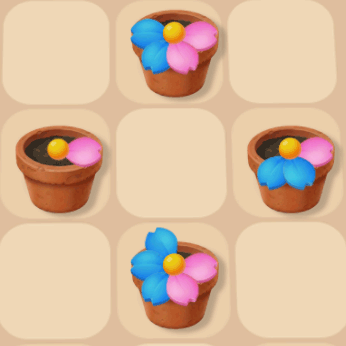
Your goal is to place flower pots on the grid, then sort matching-colored petals into pots. Drag flower pots from the bottom of the screen onto any tile in the garden. If adjacent pots have petals with matching colors, the petals will transfer to the pot with empty petal slots. Each flower pot can hold a maximum of six petals. When a pot contains six petals of the same color, it is removed from the board and you earn coins. Empty flower pots are also removed, but you don't earn coins from them. You can spend your coins on new flower pot designs.
Planted too many flowers? Dig yourself out of trouble with the shovel booster! Tap the shovel icon on the bottom right of the grid, then tap on a pot to remove it.
Near the top of the screen, you'll see your current level. Every time you increase your level, you'll unlock a new flower.
It's a nice, sunny day and your flowers are waiting to be sorted.
Your goal is to place flower pots on the grid, then sort matching-colored petals into pots. Click and drag flower pots from the bottom of the screen onto any tile in the garden. If adjacent pots have petals with matching colors, the petals will transfer to the pot with empty petal slots. Each flower pot can hold a maximum of six petals. When a pot contains six petals of the same color, it is removed from the board and you earn coins. Empty flower pots are also removed, but you don't earn coins from them. You can spend your coins on new flower pot designs.
Planted too many flowers? Dig yourself out of trouble with the shovel booster! Click on the shovel icon on the bottom right of the grid, then click on a pot to remove it.
Near the top of the screen, you'll see your current level. Every time you increase your level, you'll unlock a new flower.
How to play Flower Sort on your phone
Did you know you can also play Flower Sort on your phone? It’s a great way to play without worrying about losing your save data.
For iOS devices, simply tap the "Share" icon  in Safari and select "Add to Home Screen". For Android devices, tap the “Menu” icon
  and select "Install App".
Game Progress

 4.4 / 5(206 Votes)
Instructions
It's a nice, sunny day and your flowers are waiting to be sorted.
Your goal is to place flower pots on the grid, then sort matching-colored petals into pots. Drag flower pots from the bottom of the screen onto any tile in the garden. If adjacent pots have petals with matching colors, the petals will transfer to the pot with empty petal slots. Each flower pot can hold a maximum of six petals. When a pot contains six petals of the same color, it is removed from the board and you earn coins. Empty flower pots are also removed, but you don't earn coins from them. You can spend your coins on new flower pot designs.
Planted too many flowers? Dig yourself out of trouble with the shovel booster! Tap the shovel icon on the bottom right of the grid, then tap on a pot to remove it.
Near the top of the screen, you'll see your current level. Every time you increase your level, you'll unlock a new flower.
How to play Flower Sort on your phone
To play Flower Sort easily any time, you can add it directly to your phone as an app. It’s a great way to play without worrying about losing your game save data.
For iOS devices, simply tap the "Share" icon in Safari and select "Add to Home Screen". For Android devices, tap the “Menu” icon and select "Install App".
Votes