












heXsum







 3.8 / 5(603 Votes)
Instructions
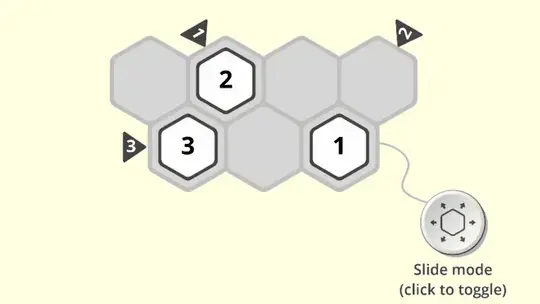
Your goal is to fill the grid with the right numbers in each row and column. When you see an arrow outside the board, the tiles that the arrow is pointing at must add up to the number on the arrow. When you have it right, the arrow will turn green!
Drag a tile to move it to an adjacent space. You can slide two tiles on top of each other to merge them and add their number together.
In later levels, you can tap the toggle to switch to divide mode. When you are in divide mode, drag an even numbered tile to split it in half.
If you want to undo your last move, tap the arrow facing backwards. To restart the whole level, tap the circling arrows.
Your goal is to fill the grid with the right numbers in each row and column. When you see an arrow outside the board, the tiles that the arrow is pointing at must add up to the number on the arrow. When you have it right, the arrow will turn green!
Click and drag a tile to move it to an adjacent space. You can slide two tiles on top of each other to merge them and add their number together.
In later levels, you can click the toggle to switch to divide mode. When you are in divide mode, click and drag on an even numbered tile to split it in half.
If you want to undo your last move, click the arrow facing backwards. To restart the whole level, click the circling arrows.
How to play heXsum on your phone
Did you know you can also play heXsum on your phone? It’s a great way to play without worrying about losing your save data.
For iOS devices, simply tap the "Share" icon  in Safari and select "Add to Home Screen". For Android devices, tap the “Menu” icon
  and select "Install App".
Game Progress

 3.8 / 5(603 Votes)
Instructions
Your goal is to fill the grid with the right numbers in each row and column. When you see an arrow outside the board, the tiles that the arrow is pointing at must add up to the number on the arrow. When you have it right, the arrow will turn green!
Drag a tile to move it to an adjacent space. You can slide two tiles on top of each other to merge them and add their number together.
In later levels, you can tap the toggle to switch to divide mode. When you are in divide mode, drag an even numbered tile to split it in half.
If you want to undo your last move, tap the arrow facing backwards. To restart the whole level, tap the circling arrows.
How to play heXsum on your phone
To play heXsum easily any time, you can add it directly to your phone as an app. It’s a great way to play without worrying about losing your game save data.
For iOS devices, simply tap the "Share" icon in Safari and select "Add to Home Screen". For Android devices, tap the “Menu” icon and select "Install App".
Votes