












Melody Shuffle












Instructions
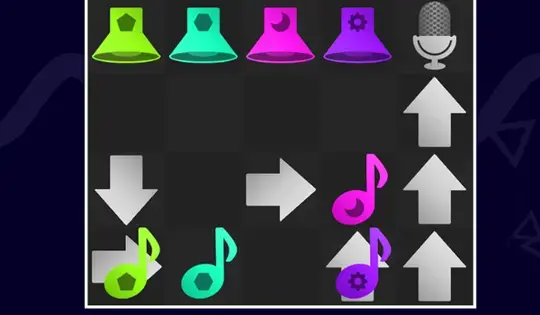
Drag the arrows on the grid to guide the musical notes to the microphone. Objects flashing white are movable, meaning the mic can sometimes be moved.
Keep an eye on the pattern shown in the box on top of the screen. Single notes are played one after another, but if you notice notes overlapping, that means they have to be played together.
Keep the melody smooth, don't mess up the beat!
Click and drag the arrows on the grid to guide the musical notes to the microphone. Objects flashing white are movable, meaning the mic can sometimes be moved.
Keep an eye on the pattern shown in the box on top of the screen. Single notes are played one after another, but if you notice notes overlapping, that means they have to be played together.
Keep the melody smooth, don't mess up the beat!
How to play Melody Shuffle on your phone
Did you know you can also play Melody Shuffle on your phone? It’s a great way to play without worrying about losing your save data.
For iOS devices, simply tap the "Share" icon  in Safari and select "Add to Home Screen". For Android devices, tap the “Menu” icon
 and select "Install App".
Game Progress


Instructions
Drag the arrows on the grid to guide the musical notes to the microphone. Objects flashing white are movable, meaning the mic can sometimes be moved.
Keep an eye on the pattern shown in the box on top of the screen. Single notes are played one after another, but if you notice notes overlapping, that means they have to be played together.
Keep the melody smooth, don't mess up the beat!
How to play Melody Shuffle on your phone
To play Melody Shuffle easily any time, you can add it directly to your phone as an app. It’s a great way to play without worrying about losing your game save data.
For iOS devices, simply tap the "Share" icon in Safari and select "Add to Home Screen". For Android devices, tap the “Menu” icon and select "Install App".

Votes