













Pik Cells









Instructions
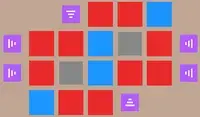
Your goal is to stretch the colors on the grid to make a picture! Drag a color in a cell around the grid. Colors can be dragged vertically or horizontally, or even both! Each color has a number on it that shows how many cells it can fill. You'll need to fully use each color in order to paint the cells! In some puzzles, you won't need to fully fill the grid.
One twist is that each level has a 'correct' picture that you are trying to form. If you use up all the colors and the level isn't completing, then you need to try another design!
In later levels, there will be numbers at the end of a row or column. This shows how many cells of a certain color you have to put in the row or column.
Your goal is to stretch the colors on the grid to make a picture! Click a color in a cell and drag it around the grid. Colors can be dragged vertically or horizontally, or even both! Each color has a number on it that shows how many cells it can fill. You'll need to fully use each color in order to paint the cells! In some puzzles, you won't need to fully fill the grid.
One twist is that each level has a 'correct' picture that you are trying to form. If you use up all the colors and the level isn't completing, then you need to try another design!
In later levels, there will be numbers at the end of a row or column. This shows how many cells of a certain color you have to put in the row or column.
How to play Pik Cells on your phone
Did you know you can also play Pik Cells on your phone? It’s a great way to play without worrying about losing your save data.
For iOS devices, simply tap the "Share" icon  in Safari and select "Add to Home Screen". For Android devices, tap the “Menu” icon
  and select "Install App".

Game Progress


Instructions
Your goal is to stretch the colors on the grid to make a picture! Drag a color in a cell around the grid. Colors can be dragged vertically or horizontally, or even both! Each color has a number on it that shows how many cells it can fill. You'll need to fully use each color in order to paint the cells! In some puzzles, you won't need to fully fill the grid.
One twist is that each level has a 'correct' picture that you are trying to form. If you use up all the colors and the level isn't completing, then you need to try another design!
In later levels, there will be numbers at the end of a row or column. This shows how many cells of a certain color you have to put in the row or column.
How to play Pik Cells on your phone
To play Pik Cells easily any time, you can add it directly to your phone as an app. It’s a great way to play without worrying about losing your game save data.
For iOS devices, simply tap the "Share" icon in Safari and select "Add to Home Screen". For Android devices, tap the “Menu” icon and select "Install App".

Votes