










Puzzle Blocks
Instructions
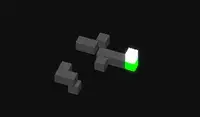
These shapes have lost some of their pieces! Your goal is to place each piece in the correct spot. Swipe to rotate the shape.
Each piece will be positioned away from the shape and you'll need to find where it should go. As you rotate the shape, you'll see the white holes where the pieces should go. When you're ready to place one of the pieces, click on the piece and watch it fit into the shape.
Later levels will introduce more challenges for you. Some of these challenges include restoring the shape in a certain amount of moves, placing pieces all at once instead of individually, or having to restore the shape while also adjusting the lights as they flicker on and off!
These shapes have lost some of their pieces! Your goal is to place each piece in the correct spot. Use the WASD keys to rotate the shape.
Each piece will be positioned away from the shape and you'll need to find where it should go. As you rotate the shape, you'll see the white holes where the pieces should go. When you're ready to place one of the pieces, click on the piece and watch it fit into the shape.
Later levels will introduce more challenges for you. Some of these challenges include restoring the shape in a certain amount of moves, placing pieces all at once instead of individually, or having to restore the shape while also adjusting the lights as they flicker on and off!
How to play Puzzle Blocks on your phone
Did you know you can also play Puzzle Blocks on your phone? It’s a great way to play without worrying about losing your save data.
For iOS devices, simply tap the "Share" icon  in Safari and select "Add to Home Screen". For Android devices, tap the “Menu” icon
  and select "Install App".

Game Progress


Instructions
These shapes have lost some of their pieces! Your goal is to place each piece in the correct spot. Swipe to rotate the shape.
Each piece will be positioned away from the shape and you'll need to find where it should go. As you rotate the shape, you'll see the white holes where the pieces should go. When you're ready to place one of the pieces, click on the piece and watch it fit into the shape.
Later levels will introduce more challenges for you. Some of these challenges include restoring the shape in a certain amount of moves, placing pieces all at once instead of individually, or having to restore the shape while also adjusting the lights as they flicker on and off!
How to play Puzzle Blocks on your phone
To play Puzzle Blocks easily any time, you can add it directly to your phone as an app. It’s a great way to play without worrying about losing your game save data.
For iOS devices, simply tap the "Share" icon in Safari and select "Add to Home Screen". For Android devices, tap the “Menu” icon and select "Install App".

Votes