








Step Spots






 3.4 / 5(216 Votes)
Instructions
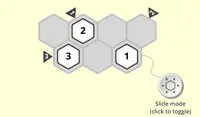
Tap on the shape and drag it along the path of white lights to fill up the holes. If there's no white light, you can't move in that direction.
The red shapes move horizontally and vertically while blue shapes move diagonally. In later levels, you can switch the color of a shape if you cross over a spot that has a red and blue shape with arrows on it!
Click on the shape and drag it along the path of white lights to fill up the holes. If there's no white light, you can't move in that direction.
The red shapes move horizontally and vertically while blue shapes move diagonally. In later levels, you can switch the color of a shape if you cross over a spot that has a red and blue shape with arrows on it!
How to play Step Spots on your phone
Did you know you can also play Step Spots on your phone? It’s a great way to play without worrying about losing your save data.
For iOS devices, simply tap the "Share" icon  in Safari and select "Add to Home Screen". For Android devices, tap the “Menu” icon
 and select "Install App".

Game Progress

 3.4 / 5(216 Votes)
Instructions
Tap on the shape and drag it along the path of white lights to fill up the holes. If there's no white light, you can't move in that direction.
The red shapes move horizontally and vertically while blue shapes move diagonally. In later levels, you can switch the color of a shape if you cross over a spot that has a red and blue shape with arrows on it!
How to play Step Spots on your phone
To play Step Spots easily any time, you can add it directly to your phone as an app. It’s a great way to play without worrying about losing your game save data.
For iOS devices, simply tap the "Share" icon in Safari and select "Add to Home Screen". For Android devices, tap the “Menu” icon and select "Install App".
Votes