












Super Number Defense











 4.4 / 5(19,432 Votes)
Instructions
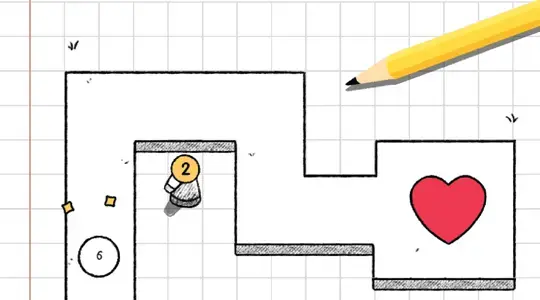
Your goal is to defend the heart from all attackers. Tap on an open circle to place a turret for 100 gold. It will automatically fire at any incoming numbers.
Later on, you'll need to upgrade your turrets. Tap on a turret to open the upgrade panel. Here, you can buy extra numbers and math operators to increase its damage output. After you buy them, drag to arrange them into a mathematical equation.
For example, if your turret is at 1 attack power, you can buy a plus sign and a 1 to increase its attack power to 2.
Some enemies can only be defeated by turrets that match their color. Your turret's color is always set by whichever mathematical operator it is using the most. For example, if you have 2 yellow minus signs and 1 blue plus sign in your formula, then the turret will be yellow. Before a new wave starts, you can see a preview of which enemy types are coming at the top of the screen.
Your goal is to defend the heart from all attackers. Click on an open circle to place a turret for 100 gold. It will automatically fire at any incoming numbers.
Later on, you'll need to upgrade your turrets. Click on a turret to open the upgrade panel. Here, you can buy extra numbers and math operators to increase its damage output. After you buy them, click and drag to arrange them into a mathematical equation.
For example, if your turret is at 1 attack power, you can buy a plus sign and a 1 to increase its attack power to 2.
Some enemies can only be defeated by turrets that match their color. Your turret's color is always set by whichever mathematical operator it is using the most. For example, if you have 2 yellow minus signs and 1 blue plus sign in your formula, then the turret will be yellow. Before a new wave starts, you can see a preview of which enemy types are coming at the top of the screen.
How to play Super Number Defense on your phone
Did you know you can also play Super Number Defense on your phone? It’s a great way to play without worrying about losing your save data.
For iOS devices, simply tap the "Share" icon  in Safari and select "Add to Home Screen". For Android devices, tap the “Menu” icon
  and select "Install App".
Game Progress

 4.4 / 5(19,432 Votes)
Instructions
Your goal is to defend the heart from all attackers. Tap on an open circle to place a turret for 100 gold. It will automatically fire at any incoming numbers.
Later on, you'll need to upgrade your turrets. Tap on a turret to open the upgrade panel. Here, you can buy extra numbers and math operators to increase its damage output. After you buy them, drag to arrange them into a mathematical equation.
For example, if your turret is at 1 attack power, you can buy a plus sign and a 1 to increase its attack power to 2.
Some enemies can only be defeated by turrets that match their color. Your turret's color is always set by whichever mathematical operator it is using the most. For example, if you have 2 yellow minus signs and 1 blue plus sign in your formula, then the turret will be yellow. Before a new wave starts, you can see a preview of which enemy types are coming at the top of the screen.
How to play Super Number Defense on your phone
To play Super Number Defense easily any time, you can add it directly to your phone as an app. It’s a great way to play without worrying about losing your game save data.
For iOS devices, simply tap the "Share" icon in Safari and select "Add to Home Screen". For Android devices, tap the “Menu” icon and select "Install App".
Votes