








Tap to Ten






 4.2 / 5(735 Votes)
Instructions
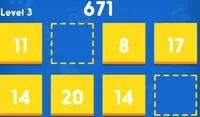
Select tiles to add up to exactly 10! Tap a tile to select it. Once you select your first tile, you can only select tiles next to that tile. However, you can select as many tiles as you want. If you select tiles that add up to more than 10, the tiles will be outlined in red, and you'll need to tap some of the tiles you have selected to deselect them. You can also tap a tile to deselect if you are having trouble finding other tiles nearby to add up to 10.
The more tiles you use, the more points you'll earn! Fill up the bar at the top of the screen to move to the next level.
Select tiles to add up to exactly 10! Click on a tile to select it. Once you select your first tile, you can only select tiles next to that tile. However, you can select as many tiles as you want. If you select tiles that add up to more than 10, the tiles will be outlined in red, and you'll need to click some of the tiles you have selected to deselect them. You can also click a tile to deselect if you are having trouble finding other tiles nearby to add up to 10.
The more tiles you use, the more points you'll earn! Fill up the bar at the top of the screen to move to the next level.
How to play Tap to Ten on your phone
Did you know you can also play Tap to Ten on your phone? It’s a great way to play without worrying about losing your save data.
For iOS devices, simply tap the "Share" icon  in Safari and select "Add to Home Screen". For Android devices, tap the “Menu” icon
 and select "Install App".

Game Progress

 4.2 / 5(735 Votes)
Instructions
Select tiles to add up to exactly 10! Tap a tile to select it. Once you select your first tile, you can only select tiles next to that tile. However, you can select as many tiles as you want. If you select tiles that add up to more than 10, the tiles will be outlined in red, and you'll need to tap some of the tiles you have selected to deselect them. You can also tap a tile to deselect if you are having trouble finding other tiles nearby to add up to 10.
The more tiles you use, the more points you'll earn! Fill up the bar at the top of the screen to move to the next level.
How to play Tap to Ten on your phone
To play Tap to Ten easily any time, you can add it directly to your phone as an app. It’s a great way to play without worrying about losing your game save data.
For iOS devices, simply tap the "Share" icon in Safari and select "Add to Home Screen". For Android devices, tap the “Menu” icon and select "Install App".
Votes