












Tortuga Racing


 4.4 / 5(1,824 Votes)
Instructions
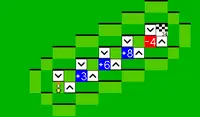
Ready, get set, solve! To start, customize your turtle with a fun color and stickers (you can earn more stickers through winning races). Your goal is to complete the four main races: addition, subtraction, multiplication, and division.
When you start a race, you'll be prompted to answer math equations. You'll need to solve these to get a speed boost, and hopefully win the race! When you answer questions successfully, you'll also fill up your turbo meter. Once it's full, tap the Turbo icon in the middle of the answers to get a speed boost. If you win a race, you'll unlock the next track.
As you earn stars, you can use those to unlock more stickers to customize your turtle!
Ready, get set, solve! To start, customize your turtle with a fun color and stickers (you can earn more stickers through winning races). Your goal is to complete the four main races: addition, subtraction, multiplication, and division.
When you start a race, you'll be prompted to answer math equations. You'll need to solve these to get a speed boost, and hopefully win the race! When you answer questions successfully, you'll also fill up your turbo meter. Once it's full, click the Turbo icon in the middle of the answers to get a speed boost. If you win a race, you'll unlock the next track.
As you earn stars, you can use those to unlock more stickers to customize your turtle!
How to play Tortuga Racing on your phone
Did you know you can also play Tortuga Racing on your phone? It’s a great way to play without worrying about losing your save data.
For iOS devices, simply tap the "Share" icon  in Safari and select "Add to Home Screen". For Android devices, tap the “Menu” icon
 and select "Install App".

Game Progress

 4.4 / 5(1,824 Votes)
Instructions
Ready, get set, solve! To start, customize your turtle with a fun color and stickers (you can earn more stickers through winning races). Your goal is to complete the four main races: addition, subtraction, multiplication, and division.
When you start a race, you'll be prompted to answer math equations. You'll need to solve these to get a speed boost, and hopefully win the race! When you answer questions successfully, you'll also fill up your turbo meter. Once it's full, tap the Turbo icon in the middle of the answers to get a speed boost. If you win a race, you'll unlock the next track.
As you earn stars, you can use those to unlock more stickers to customize your turtle!
How to play Tortuga Racing on your phone
To play Tortuga Racing easily any time, you can add it directly to your phone as an app. It’s a great way to play without worrying about losing your game save data.
For iOS devices, simply tap the "Share" icon in Safari and select "Add to Home Screen". For Android devices, tap the “Menu” icon and select "Install App".
Votes