
Werbehinweis
Dieses Spiel ist ausschließlich über einen Herausgeber erhältlich, der Anzeigen in die Spieldateien integriert hat. Aus diesem Grund können wir die Anzeigen für Abonnenten nicht entfernen, wie wir es für alle anderen Seiten der Website tun.










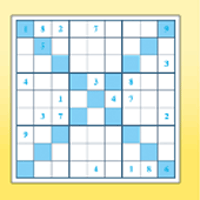


Killer Sudoku
Sie werden es auch mögen




 3.5 / 5(633 Stimmen)
Anweisungen
Tap on a square and type the number you want to fill in the square. Like regular Sudoku, you use the numbers 1-9 in the 3x3 boxes on the grid. Each number can only appear once in a box, but can't be repeated in the same row or column.
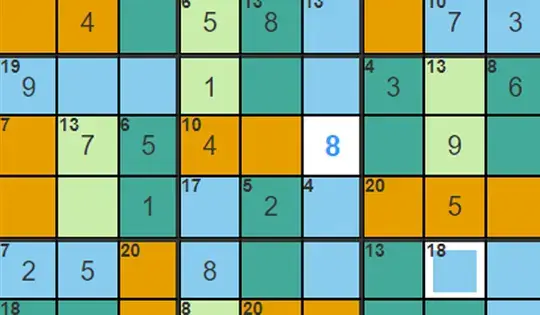
There's a new challenge, and it involves some math! In the upper left corner, some squares will have a number and a group of boxes around it are the same color. As you fill in the squares, you have to make sure your answers add up to the corner number.
If the number you type in is red, that means the number doesn't belong in that spot. If the number is black, that means you put it in the right place!
HINT: If you're stuck, click the lightbulb and you can reveal the answer to a certain square (or reveal the entire puzzle!)
Click on a square and type the number you want to fill in the square. Like regular Sudoku, you use the numbers 1-9 in the 3x3 boxes on the grid. Each number can only appear once in a box, but can't be repeated in the same row or column.
There's a new challenge, and it involves some math! In the upper left corner, some squares will have a number and a group of boxes around it are the same color. As you fill in the squares, you have to make sure your answers add up to the corner number.
If the number you type in is red, that means the number doesn't belong in that spot. If the number is black, that means you put it in the right place!
HINT: If you're stuck, click the lightbulb and you can reveal the answer to a certain square (or reveal the entire puzzle!)
So spielen Sie Killer Sudoku auf Ihrem Handy
Wussten Sie, dass Sie Killer Sudoku auch auf Ihrem Handy spielen können? Es ist eine großartige Möglichkeit zu spielen, ohne sich Gedanken über den Verlust Ihrer gespeicherten Daten machen zu müssen.
Tippen Sie bei iOS-Geräten einfach auf das Symbol "Aktie"  in Safari und wählen Sie "Zum Startbildschirm hinzufügen". Tippen Sie bei Android-Geräten auf das Symbol "Menü"
  und wählen Sie "App installieren“"
Werbehinweis
Dieses Spiel ist ausschließlich über einen Herausgeber erhältlich, der Anzeigen in die Spieldateien integriert hat. Aus diesem Grund können wir die Anzeigen für Abonnenten nicht entfernen, wie wir es für alle anderen Seiten der Website tun.
Spielfortschritt


Sie werden es auch mögen
3.5 / 5(633 Stimmen)Anweisungen
Tap on a square and type the number you want to fill in the square. Like regular Sudoku, you use the numbers 1-9 in the 3x3 boxes on the grid. Each number can only appear once in a box, but can't be repeated in the same row or column.
There's a new challenge, and it involves some math! In the upper left corner, some squares will have a number and a group of boxes around it are the same color. As you fill in the squares, you have to make sure your answers add up to the corner number.
If the number you type in is red, that means the number doesn't belong in that spot. If the number is black, that means you put it in the right place!
HINT: If you're stuck, click the lightbulb and you can reveal the answer to a certain square (or reveal the entire puzzle!)
So spielen Sie Killer Sudoku auf Ihrem Handy
Um Killer Sudoku jederzeit einfach zu spielen, können Sie es direkt als App zu Ihrem Telefon hinzufügen. Es ist eine großartige Möglichkeit zu spielen, ohne sich Gedanken über den Verlust Ihrer Spielspeicherdaten machen zu müssen.
Tippen Sie bei iOS-Geräten einfach auf das Symbol "Aktie" in Safari und wählen Sie "Zum Startbildschirm hinzufügen". Tippen Sie bei Android-Geräten auf das Symbol "Menü" und wählen Sie "App installieren".
Stimmen