










FreeCell









How to play FreeCell
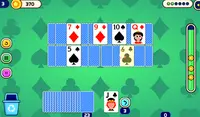
Your goal is to stack all of the cards in play into the "foundation piles" in the upper right hand corner of the screen. Cards must be played to these foundation cards in order, starting with Ace, then 2, then 3, and so on through King.
In order to do that you'll need to stack your cards at the bottom of the table in columns of cards in decreasing order. Any card may be stacked on top of another card with a rank 1 higher of the opposite color. So a 5 of Clubs can be stacked on a 6 of Hearts or Diamonds, but not any other rank, and not the 6 of Spades. Once you've started stacking cards, you can move your stacks provided you have enough free slots on the top left hand of the screen. You can always move 1 card for free, but you need 1 slot open in order to move 2 cards, 2 slots open in order to move 3 cards, and so on. If you clear a column of cards on the board, you can also move cards to the open FreeCell spaces there, and can keep as many cards there as you like.
This can be a really tough game to get the hang of! Try to focus on "freeing" the Aces of each suit so that you can start playing cards up to the foundation spaces. Good luck!
Your goal is to stack all of the cards in play into the "foundation piles" in the upper right hand corner of the screen. Cards must be played to these foundation cards in order, starting with Ace, then 2, then 3, and so on through King.
In order to do that you'll need to stack your cards at the bottom of the table in columns of cards in decreasing order. Any card may be stacked on top of another card with a rank 1 higher of the opposite color. So a 5 of Clubs can be stacked on a 6 of Hearts or Diamonds, but not any other rank, and not the 6 of Spades. Once you've started stacking cards, you can move your stacks provided you have enough free slots on the top left hand of the screen. You can always move 1 card for free, but you need 1 slot open in order to move 2 cards, 2 slots open in order to move 3 cards, and so on. If you clear a column of cards on the board, you can also move cards to the open FreeCell spaces there, and can keep as many cards there as you like.
This can be a really tough game to get the hang of! Try to focus on "freeing" the Aces of each suit so that you can start playing cards up to the foundation spaces. Good luck!
What are Games Like FreeCell?
- Hearts: The classic card game is here!
- Solitaire: The classic single player card game.
- Spider Solitaire: An easier twist on the classic game.
- 31: Swap cards and make the high hand!
- Rummy: How many sets can you make?
- Pyramid Solitaire: 13 is your new lucky number!
- Tripeaks Solitaire: Learn this new way to play solitaire!
- Cribbage: Score 121 points in this multiplayer card game!
- Gin Rummy: Build powerful card combos and reach 100 points!
- Bridge: Take the win in this trick-taking game!
How to play FreeCell on your phone
Did you know you can also play FreeCell on your phone? It’s a great way to play without worrying about losing your save data.
For iOS devices, simply tap the "Share" icon  in Safari and select "Add to Home Screen". For Android devices, tap the “Menu” icon
  and select "Install App".
Game Progress


How to play FreeCell
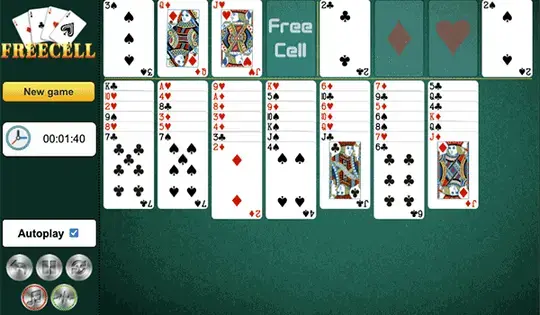
Your goal is to stack all of the cards in play into the "foundation piles" in the upper right hand corner of the screen. Cards must be played to these foundation cards in order, starting with Ace, then 2, then 3, and so on through King.
In order to do that you'll need to stack your cards at the bottom of the table in columns of cards in decreasing order. Any card may be stacked on top of another card with a rank 1 higher of the opposite color. So a 5 of Clubs can be stacked on a 6 of Hearts or Diamonds, but not any other rank, and not the 6 of Spades. Once you've started stacking cards, you can move your stacks provided you have enough free slots on the top left hand of the screen. You can always move 1 card for free, but you need 1 slot open in order to move 2 cards, 2 slots open in order to move 3 cards, and so on. If you clear a column of cards on the board, you can also move cards to the open FreeCell spaces there, and can keep as many cards there as you like.
This can be a really tough game to get the hang of! Try to focus on "freeing" the Aces of each suit so that you can start playing cards up to the foundation spaces. Good luck!
How to play FreeCell on your phone
To play FreeCell easily any time, you can add it directly to your phone as an app. It’s a great way to play without worrying about losing your game save data.
For iOS devices, simply tap the "Share" icon in Safari and select "Add to Home Screen". For Android devices, tap the “Menu” icon and select "Install App".

Votes