













Lonely Duck












Instructions
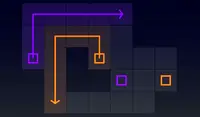
Slide on every button to find your way home! Swipe to move. You will slide until you reach the end of a path. Make sure all of the buttons are pressed down to reveal the pond and escape from the icy cold!
When you slide over a pressed button, it will become unpressed. If you get stuck, tap the arrow button to restart.
In later levels, there will be brown boxes that will break when you slide up to them.
Slide over every button to find your way home! Use the Arrow Keys or WASD to move. You will slide until you reach the end of a path. Make sure all of the buttons are pressed down to reveal the pond and escape from the icy cold!
When you slide over a pressed button, it will become unpressed. If you get stuck, press R to restart the level.
In later levels, there will be brown boxes that will break when you slide up to them.
How to play Lonely Duck on your phone
Did you know you can also play Lonely Duck on your phone? It’s a great way to play without worrying about losing your save data.
For iOS devices, simply tap the "Share" icon  in Safari and select "Add to Home Screen". For Android devices, tap the “Menu” icon
  and select "Install App".

Game Progress


Instructions
Slide on every button to find your way home! Swipe to move. You will slide until you reach the end of a path. Make sure all of the buttons are pressed down to reveal the pond and escape from the icy cold!
When you slide over a pressed button, it will become unpressed. If you get stuck, tap the arrow button to restart.
In later levels, there will be brown boxes that will break when you slide up to them.
How to play Lonely Duck on your phone
To play Lonely Duck easily any time, you can add it directly to your phone as an app. It’s a great way to play without worrying about losing your game save data.
For iOS devices, simply tap the "Share" icon in Safari and select "Add to Home Screen". For Android devices, tap the “Menu” icon and select "Install App".

Votes