












UnTetris






Instructions
Your goal is to remove all the red blocks above by using the shapes provided at the bottom of the screen.
To remove red blocks, drag a white-outlined shape from the bottom of the screen onto the red blocks above. The red blocks will only be removed if they match the shape exactly. If the shape doesn't fit, tap on the Rotate icon under each shape to rotate it before placing it.
You need to remove all the red blocks to successfully complete each level.
Your goal is to remove all the red blocks above by using the shapes provided at the bottom of the screen.
To remove red blocks, click and drag a white-outlined shape from the bottom of the screen onto the red blocks above. The red blocks will only be removed if they match the shape exactly. If the shape doesn't fit, you can rotate it while dragging and pressing SPACE. You can also click on the Rotate icon located under each shape to rotate it before placing it.
You need to remove all the red blocks to successfully complete each level.
How to play UnTetris on your phone
Did you know you can also play UnTetris on your phone? It’s a great way to play without worrying about losing your save data.
For iOS devices, simply tap the "Share" icon  in Safari and select "Add to Home Screen". For Android devices, tap the “Menu” icon
  and select "Install App".
Game Progress


Instructions
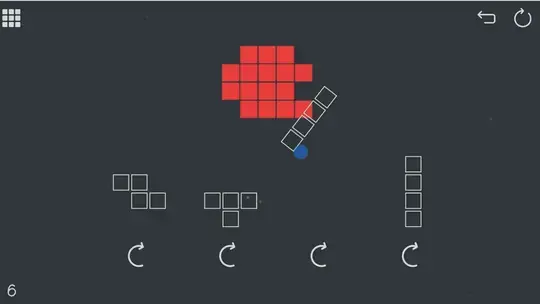
Your goal is to remove all the red blocks above by using the shapes provided at the bottom of the screen.
To remove red blocks, drag a white-outlined shape from the bottom of the screen onto the red blocks above. The red blocks will only be removed if they match the shape exactly. If the shape doesn't fit, tap on the Rotate icon under each shape to rotate it before placing it.
You need to remove all the red blocks to successfully complete each level.
How to play UnTetris on your phone
To play UnTetris easily any time, you can add it directly to your phone as an app. It’s a great way to play without worrying about losing your game save data.
For iOS devices, simply tap the "Share" icon in Safari and select "Add to Home Screen". For Android devices, tap the “Menu” icon and select "Install App".

Votes