Play *scrambles your calculator* online
15
 *scrambles your calculator* icon

*scrambles your calculator*
Genere:
Aggiornato:
Sep 14, 2026
Pubblicazione:
Sep 14, 2026
Competenze:
Disciplinary Knowledge, Time Management
Piattaforme:
Browser

Istruzioni

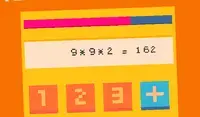
Your calculator just got scrambled! Add up to the target number listed in the goal section. Each round, the numbers on your calculator will change positions. Think carefully: when you select a number, you will only be able to use numbers adjacent to that number!

Click on the button between ADD and MULTIPLY to toggle between the two functions. The word that is lit up is the function you're using. This will help when you need to reach a big number!

Keep going until the timer runs out! The timer is in the bottom left corner of the screen. Each time you reach the goal number, you'll receive few more seconds on the timer.

La tua calcolatrice si è appena mescolata! Aggiungi fino al numero obiettivo indicato nella sezione dedicata. Ad ogni round, i numeri sulla tua calcolatrice cambieranno posizione. Pensaci bene: quando selezioni un numero, potrai usare solo i numeri adiacenti a quel numero!

Fai clic sul pulsante tra ADDIZIONE e MOLTIPLICAZIONE per passare da una funzione all'altra. La parola che si illumina indica la funzione che stai utilizzando. Questo ti sarà utile quando devi raggiungere un numero elevato!

Continua finché il timer non si esaurisce! Il timer si trova nell'angolo in basso a sinistra dello schermo. Ogni volta che raggiungi il numero obiettivo, avrai a disposizione qualche secondo in più.
Avanzamento del gioco

0 XP
Genere:
Aggiornato:
Sep 14, 2026
Pubblicazione:
Sep 14, 2026
Competenze:
Disciplinary Knowledge, Time Management
Piattaforme:
Browser

Istruzioni

Your calculator just got scrambled! Add up to the target number listed in the goal section. Each round, the numbers on your calculator will change positions. Think carefully: when you select a number, you will only be able to use numbers adjacent to that number!

Click on the button between ADD and MULTIPLY to toggle between the two functions. The word that is lit up is the function you're using. This will help when you need to reach a big number!

Keep going until the timer runs out! The timer is in the bottom left corner of the screen. Each time you reach the goal number, you'll receive few more seconds on the timer.

La tua calcolatrice si è appena mescolata! Aggiungi fino al numero obiettivo indicato nella sezione dedicata. Ad ogni round, i numeri sulla tua calcolatrice cambieranno posizione. Pensaci bene: quando selezioni un numero, potrai usare solo i numeri adiacenti a quel numero!

Fai clic sul pulsante tra ADDIZIONE e MOLTIPLICAZIONE per passare da una funzione all'altra. La parola che si illumina indica la funzione che stai utilizzando. Questo ti sarà utile quando devi raggiungere un numero elevato!

Continua finché il timer non si esaurisce! Il timer si trova nell'angolo in basso a sinistra dello schermo. Ogni volta che raggiungi il numero obiettivo, avrai a disposizione qualche secondo in più.