












申し訳ありません...このゲームはブラウザで再生できません。

このフラッシュゲームは現在、ブラウザでは再生できませんが、修正に取り組んでいます!定期的に戻って、プレイする準備ができているかどうかを確認してください。
ほとんどのブラウザはフラッシュをサポートしなくなりました。影響を受けるゲームはによって示されます


レビューしたゲーム内容Pao Salcedo
指示
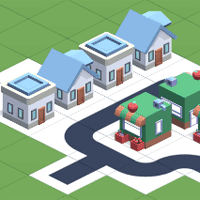
Prepare to build your very own city! To start, you'll lay down your first road tile. Move your mouse to where you want to place the tile in the grid. Once you find a good spot, click to place it. If you want to rotate a tile, press SPACE or click the "Rotate building" button at the bottom of the screen. Roads always need to be connected to another road. Click on the magnifying glass in the bottom right corner of the screen to zoom in and out. If you want to rotate your city to get a better view, press R.
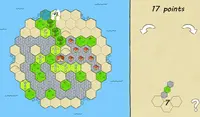
Now you can start placing houses and other buildings to earn points! It's best to place houses near the road to earn more points. If a house isn't next to a road tile, you'll earn a lower score on your city. Group houses together to make a bustling neighborhood and earn more points. You can see how many points you will get for each building based on the little bubble above it. If it's green, you'll earn points! But if it's red, you'll lose points.
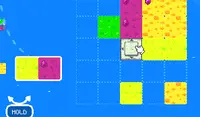
You can see which tile you'll get next by looking at the left part of the screen where the list of buildings will be shown. As you get more buildings like shops, offices, factories, and cafes, it's important to note that some buildings shouldn't be placed next to others. For example, you shouldn't place factories near homes because the residents may not like it, which will make you lose points. Each building has it's own set of rules. Experiment with each building to see how to earn as many points as possible with it. You can see how buildings earn you points based on their placements by clicking on the question mark button in the upper right corner.
Your score (total citizens) is shown at the top of the screen. As your city grows, you will earn special tiles AND more room on the map to build your city!
自分だけの街を建設する準備をしましょう!まずは最初の道路タイルを敷きましょう。グリッド上でタイルを置きたい場所にマウスを動かします。良い場所を見つけたら、クリックして配置します。タイルを回転させたい場合は、スペースキーを押すか、画面下部の「建物を回転」ボタンをクリックしてください。道路は常に他の道路と繋がっている必要があります。画面右下の虫眼鏡アイコンをクリックすると、拡大・縮小できます。街を回転させて見やすくしたい場合は、Rキーを押します。
さあ、家やその他の建物を配置してポイントを獲得しましょう!より多くのポイントを獲得するには、道路の近くに家を配置するのが最適です。家が道路タイルの隣にない場合、都市のスコアが低くなります。家を集めて賑やかな地区を作り、より多くのポイントを獲得しましょう。各建物の上にある小さなバブルで、獲得できるポイントを確認できます。緑色ならポイントを獲得できます!赤色ならポイントを失います。
次にどのタイルを建てるかは、画面左側の建物リストで確認できます。ショップ、オフィス、工場、カフェなどの建物が増えていくにつれて、一部の建物は他の建物の隣に配置すべきではないことに注意することが重要です。例えば、工場は住宅の近くに置かないでください。住民が嫌がる可能性があり、ポイントを失う可能性があります。各建物には独自のルールがあります。それぞれの建物を試して、どのようにすればより多くのポイントを獲得できるかを確認してください。右上の疑問符ボタンをクリックすると、建物の配置に基づいてどのようにポイントを獲得するかを確認できます。
スコア(市民総数)は画面上部に表示されます。都市が成長すると、特別なタイルを獲得できるだけでなく、マップ上で都市を建設するためのスペースも増えます!

Just a moment while your advertisement loads
広告
Just a moment while your advertisement loads
広告
レビューしたゲーム内容Pao Salcedo
指示
Prepare to build your very own city! To start, you'll lay down your first road tile. Move your mouse to where you want to place the tile in the grid. Once you find a good spot, click to place it. If you want to rotate a tile, press SPACE or click the "Rotate building" button at the bottom of the screen. Roads always need to be connected to another road. Click on the magnifying glass in the bottom right corner of the screen to zoom in and out. If you want to rotate your city to get a better view, press R.
Now you can start placing houses and other buildings to earn points! It's best to place houses near the road to earn more points. If a house isn't next to a road tile, you'll earn a lower score on your city. Group houses together to make a bustling neighborhood and earn more points. You can see how many points you will get for each building based on the little bubble above it. If it's green, you'll earn points! But if it's red, you'll lose points.
You can see which tile you'll get next by looking at the left part of the screen where the list of buildings will be shown. As you get more buildings like shops, offices, factories, and cafes, it's important to note that some buildings shouldn't be placed next to others. For example, you shouldn't place factories near homes because the residents may not like it, which will make you lose points. Each building has it's own set of rules. Experiment with each building to see how to earn as many points as possible with it. You can see how buildings earn you points based on their placements by clicking on the question mark button in the upper right corner.
Your score (total citizens) is shown at the top of the screen. As your city grows, you will earn special tiles AND more room on the map to build your city!
自分だけの街を建設する準備をしましょう!まずは最初の道路タイルを敷きましょう。グリッド上でタイルを置きたい場所にマウスを動かします。良い場所を見つけたら、クリックして配置します。タイルを回転させたい場合は、スペースキーを押すか、画面下部の「建物を回転」ボタンをクリックしてください。道路は常に他の道路と繋がっている必要があります。画面右下の虫眼鏡アイコンをクリックすると、拡大・縮小できます。街を回転させて見やすくしたい場合は、Rキーを押します。
さあ、家やその他の建物を配置してポイントを獲得しましょう!より多くのポイントを獲得するには、道路の近くに家を配置するのが最適です。家が道路タイルの隣にない場合、都市のスコアが低くなります。家を集めて賑やかな地区を作り、より多くのポイントを獲得しましょう。各建物の上にある小さなバブルで、獲得できるポイントを確認できます。緑色ならポイントを獲得できます!赤色ならポイントを失います。
次にどのタイルを建てるかは、画面左側の建物リストで確認できます。ショップ、オフィス、工場、カフェなどの建物が増えていくにつれて、一部の建物は他の建物の隣に配置すべきではないことに注意することが重要です。例えば、工場は住宅の近くに置かないでください。住民が嫌がる可能性があり、ポイントを失う可能性があります。各建物には独自のルールがあります。それぞれの建物を試して、どのようにすればより多くのポイントを獲得できるかを確認してください。右上の疑問符ボタンをクリックすると、建物の配置に基づいてどのようにポイントを獲得するかを確認できます。
スコア(市民総数)は画面上部に表示されます。都市が成長すると、特別なタイルを獲得できるだけでなく、マップ上で都市を建設するためのスペースも増えます!
投票


