












Siamo spiacenti... questo gioco non è riproducibile nel tuo browser.

Questo gioco Flash non è attualmente riproducibile nel tuo browser, ma stiamo lavorando a una soluzione! Torna regolarmente per vedere se è pronto per giocare.
La maggior parte dei browser non supporta più Flash. I giochi interessati sono indicati da


Tiny City
Contenuti del gioco recensiti daPao Salcedo
Istruzioni
Prepare to build your very own city! To start, you'll lay down your first road tile. Move your mouse to where you want to place the tile in the grid. Once you find a good spot, click to place it. If you want to rotate a tile, press SPACE or click the "Rotate building" button at the bottom of the screen. Roads always need to be connected to another road. Click on the magnifying glass in the bottom right corner of the screen to zoom in and out. If you want to rotate your city to get a better view, press R.
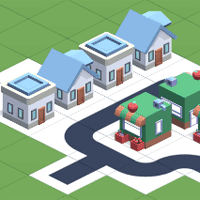
Now you can start placing houses and other buildings to earn points! It's best to place houses near the road to earn more points. If a house isn't next to a road tile, you'll earn a lower score on your city. Group houses together to make a bustling neighborhood and earn more points. You can see how many points you will get for each building based on the little bubble above it. If it's green, you'll earn points! But if it's red, you'll lose points.
You can see which tile you'll get next by looking at the left part of the screen where the list of buildings will be shown. As you get more buildings like shops, offices, factories, and cafes, it's important to note that some buildings shouldn't be placed next to others. For example, you shouldn't place factories near homes because the residents may not like it, which will make you lose points. Each building has it's own set of rules. Experiment with each building to see how to earn as many points as possible with it. You can see how buildings earn you points based on their placements by clicking on the question mark button in the upper right corner.
Your score (total citizens) is shown at the top of the screen. As your city grows, you will earn special tiles AND more room on the map to build your city!
Preparati a costruire la tua città! Per iniziare, posiziona la tua prima tessera stradale. Muovi il mouse nel punto in cui desideri posizionare la tessera nella griglia. Una volta trovato il punto giusto, clicca per posizionarla. Per ruotare una tessera, premi la barra spaziatrice o clicca sul pulsante "Ruota edificio" in basso a destra dello schermo. Le strade devono sempre essere collegate a un'altra strada. Clicca sulla lente d'ingrandimento nell'angolo in basso a destra dello schermo per ingrandire o rimpicciolire. Per ruotare la città e ottenere una visuale migliore, premi R.
Ora puoi iniziare a posizionare case e altri edifici per guadagnare punti! È meglio posizionare le case vicino alla strada per ottenere più punti. Se una casa non è adiacente a una casella di strada, otterrai un punteggio inferiore per la tua città. Raggruppa le case per creare un quartiere vivace e guadagnare più punti. Puoi vedere quanti punti otterrai per ogni edificio in base alla piccola bolla sopra di esso. Se è verde, guadagnerai punti! Ma se è rossa, perderai punti.
Puoi vedere quale tessera otterrai guardando la parte sinistra dello schermo, dove verrà mostrato l'elenco degli edifici. Man mano che ottieni più edifici come negozi, uffici, fabbriche e bar, è importante notare che alcuni edifici non dovrebbero essere posizionati accanto ad altri. Ad esempio, non dovresti posizionare le fabbriche vicino alle case perché ai residenti potrebbe non piacere, il che ti farà perdere punti. Ogni edificio ha le sue regole. Sperimenta con ogni edificio per vedere come guadagnare più punti possibile. Puoi vedere come gli edifici ti fanno guadagnare punti in base al loro posizionamento cliccando sul pulsante con il punto interrogativo nell'angolo in alto a destra.
Il tuo punteggio (numero totale di cittadini) è mostrato in cima allo schermo. Man mano che la tua città cresce, otterrai tessere speciali e più spazio sulla mappa per costruire la tua città!

Just a moment while your advertisement loads
Annuncio
Just a moment while your advertisement loads
Annuncio
Tiny City
Contenuti del gioco recensiti daPao Salcedo
Istruzioni
Prepare to build your very own city! To start, you'll lay down your first road tile. Move your mouse to where you want to place the tile in the grid. Once you find a good spot, click to place it. If you want to rotate a tile, press SPACE or click the "Rotate building" button at the bottom of the screen. Roads always need to be connected to another road. Click on the magnifying glass in the bottom right corner of the screen to zoom in and out. If you want to rotate your city to get a better view, press R.
Now you can start placing houses and other buildings to earn points! It's best to place houses near the road to earn more points. If a house isn't next to a road tile, you'll earn a lower score on your city. Group houses together to make a bustling neighborhood and earn more points. You can see how many points you will get for each building based on the little bubble above it. If it's green, you'll earn points! But if it's red, you'll lose points.
You can see which tile you'll get next by looking at the left part of the screen where the list of buildings will be shown. As you get more buildings like shops, offices, factories, and cafes, it's important to note that some buildings shouldn't be placed next to others. For example, you shouldn't place factories near homes because the residents may not like it, which will make you lose points. Each building has it's own set of rules. Experiment with each building to see how to earn as many points as possible with it. You can see how buildings earn you points based on their placements by clicking on the question mark button in the upper right corner.
Your score (total citizens) is shown at the top of the screen. As your city grows, you will earn special tiles AND more room on the map to build your city!
Preparati a costruire la tua città! Per iniziare, posiziona la tua prima tessera stradale. Muovi il mouse nel punto in cui desideri posizionare la tessera nella griglia. Una volta trovato il punto giusto, clicca per posizionarla. Per ruotare una tessera, premi la barra spaziatrice o clicca sul pulsante "Ruota edificio" in basso a destra dello schermo. Le strade devono sempre essere collegate a un'altra strada. Clicca sulla lente d'ingrandimento nell'angolo in basso a destra dello schermo per ingrandire o rimpicciolire. Per ruotare la città e ottenere una visuale migliore, premi R.
Ora puoi iniziare a posizionare case e altri edifici per guadagnare punti! È meglio posizionare le case vicino alla strada per ottenere più punti. Se una casa non è adiacente a una casella di strada, otterrai un punteggio inferiore per la tua città. Raggruppa le case per creare un quartiere vivace e guadagnare più punti. Puoi vedere quanti punti otterrai per ogni edificio in base alla piccola bolla sopra di esso. Se è verde, guadagnerai punti! Ma se è rossa, perderai punti.
Puoi vedere quale tessera otterrai guardando la parte sinistra dello schermo, dove verrà mostrato l'elenco degli edifici. Man mano che ottieni più edifici come negozi, uffici, fabbriche e bar, è importante notare che alcuni edifici non dovrebbero essere posizionati accanto ad altri. Ad esempio, non dovresti posizionare le fabbriche vicino alle case perché ai residenti potrebbe non piacere, il che ti farà perdere punti. Ogni edificio ha le sue regole. Sperimenta con ogni edificio per vedere come guadagnare più punti possibile. Puoi vedere come gli edifici ti fanno guadagnare punti in base al loro posizionamento cliccando sul pulsante con il punto interrogativo nell'angolo in alto a destra.
Il tuo punteggio (numero totale di cittadini) è mostrato in cima allo schermo. Man mano che la tua città cresce, otterrai tessere speciali e più spazio sulla mappa per costruire la tua città!
Voti


