












3D Cannon Ball







Instructions
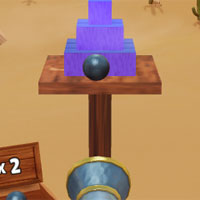
Prepare the cannon and fire at the blocks! Tap anywhere on the tower to fire.
The number on the box next to your cannon shows how many cannonballs you have to use. Don't run out of cannonballs, or you'll lose!
If you want to use a bomb for a bigger blast, click on the bomb icon in the bottom right corner of the screen.
Prepare the cannon and fire at the blocks! Use your mouse to set the cannon's aim. Once you have your aim set, click to fire your cannon!
The number on the box next to your cannon shows how many cannonballs you have to use. Don't run out of cannonballs, or you'll lose!
If you want to use a bomb for a bigger blast, click on the bomb icon in the bottom right corner of the screen.
How to play 3D Cannon Ball on your phone
Did you know you can also play 3D Cannon Ball on your phone? It’s a great way to play without worrying about losing your save data.
For iOS devices, simply tap the "Share" icon  in Safari and select "Add to Home Screen". For Android devices, tap the “Menu” icon
  and select "Install App".
Instructions
Prepare the cannon and fire at the blocks! Tap anywhere on the tower to fire.
The number on the box next to your cannon shows how many cannonballs you have to use. Don't run out of cannonballs, or you'll lose!
If you want to use a bomb for a bigger blast, click on the bomb icon in the bottom right corner of the screen.
How to play 3D Cannon Ball on your phone
To play 3D Cannon Ball easily any time, you can add it directly to your phone as an app. It’s a great way to play without worrying about losing your game save data.
For iOS devices, simply tap the "Share" icon in Safari and select "Add to Home Screen". For Android devices, tap the “Menu” icon and select "Install App".

Votes