













Simple Moves











 3.6 / 5(173 Votes)
Instructions
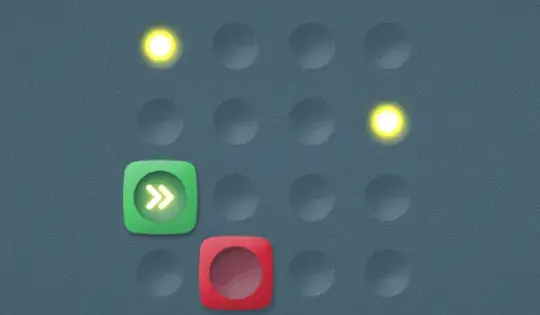
You've only got a few moves to solve each puzzle. Tap one of the squares to use a move. Look at the direction of the arrows at the top of the screen; once you tap a box, it will move in that direction!
Your goal is to move each box onto a light. If you see a move that has faded yellow arrows around it, that means you can tap to rotate it before moving a box.
You've only got a few moves to solve each puzzle. Click on one of the squares to use a move. Look at the direction of the arrows at the top of the screen; once you click a box, it will move in that direction!
Your goal is to move each box onto a light. If you see a move that has faded yellow arrows around it, that means you can click to rotate it before moving a box.
How to play Simple Moves on your phone
Did you know you can also play Simple Moves on your phone? It’s a great way to play without worrying about losing your save data.
For iOS devices, simply tap the "Share" icon  in Safari and select "Add to Home Screen". For Android devices, tap the “Menu” icon
  and select "Install App".
Game Progress

 3.6 / 5(173 Votes)
Instructions
You've only got a few moves to solve each puzzle. Tap one of the squares to use a move. Look at the direction of the arrows at the top of the screen; once you tap a box, it will move in that direction!
Your goal is to move each box onto a light. If you see a move that has faded yellow arrows around it, that means you can tap to rotate it before moving a box.
How to play Simple Moves on your phone
To play Simple Moves easily any time, you can add it directly to your phone as an app. It’s a great way to play without worrying about losing your game save data.
For iOS devices, simply tap the "Share" icon in Safari and select "Add to Home Screen". For Android devices, tap the “Menu” icon and select "Install App".
Votes