













Duck Duck Clicker






Instructions
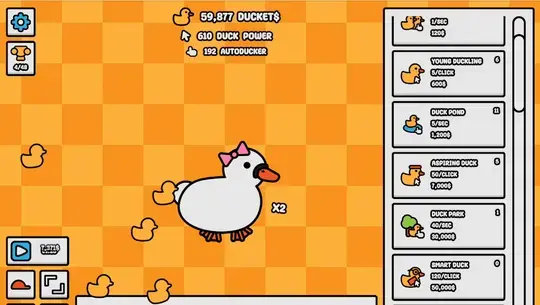
Your goal is to pet the duck and dress it up with the coolest drip. Tap on the duck at the center of the screen to earn Ducket$. You can see how much you've earned at the top of the screen. Just below that, you'll see two values: Duck Power is the amount of Ducket$ you earn per tap, and the Autoducker is how much Ducket$ you earn automatically.
At the bottom left, you can see the types of clothes you can unlock for your duck. Tap on any of the four icons to check what you've unlocked and choose which ones to wear.
The column on the right shows all the upgrades that earn you more Ducket$. Scroll through the list and tap on upgrades that have a white background. If it's grayed out, then you need to earn more Ducket$ to purchase it. At the top left of your screen, you can access the Settings menu and Achievements.
Sometimes, yellow duck icons will float across the screen. Make sure to tap on them to earn a bonus!
Can you get all the achievements and unlock the Duck Universe?
Looking for a clicker game that is a bit more serious? Check out Cookie Clicker, the classic idle game that's all about maximizing your sweet treat output. While it's certainly a greater challenge than Duck Duck Clicker, the rewards are just all the sweeter.
For a savory twist that stays pretty casual, More Sushi is another great option. The barriers of entry are very low, with super simple controls and a clear goal.
Your goal is to pet the duck and dress it up with the coolest drip. Click on the duck at the center of the screen to earn Ducket$. You can see how much you've earned at the top of the screen. Just below that, you'll see two values: Duck Power is the amount of Ducket$ you earn per click, and the Autoducker is how much Ducket$ you earn automatically.
At the bottom left, you can see the types of clothes you can unlock for your duck. Click on any of the four icons to check what you've unlocked and choose which ones to wear.
The column on the right shows all the upgrades that earn you more Ducket$. Scroll through the list and click on upgrades that have a white background. If it's grayed out, then you need to earn more Ducket$ to purchase it. At the top left of your screen, you can access the Settings menu and Achievements.
Sometimes, yellow duck icons will float across the screen. Make sure to click on them to earn a bonus!
Can you get all the achievements and unlock the Duck Universe?
If you'd rather play a clicker game that deals more with the art of sugary sweets, make sure to check out Candy Clicker and Candy Clicker 2. These games have a similar format to Duck Duck Clicker, just with some different twists and turns along the way.
Looking for a clicker game that is a bit more serious? Check out Cookie Clicker, the classic idle game that's all about maximizing your sweet treat output. While it's certainly a greater challenge than Duck Duck Clicker, the rewards are just all the sweeter.
For a savory twist that stays pretty casual, More Sushi is another great option. The barriers of entry are very low, with super simple controls and a clear goal.
How to play Duck Duck Clicker on your phone
Did you know you can also play Duck Duck Clicker on your phone? It’s a great way to play without worrying about losing your save data.
For iOS devices, simply tap the "Share" icon  in Safari and select "Add to Home Screen". For Android devices, tap the “Menu” icon
  and select "Install App".
Game Progress


Instructions
Your goal is to pet the duck and dress it up with the coolest drip. Tap on the duck at the center of the screen to earn Ducket$. You can see how much you've earned at the top of the screen. Just below that, you'll see two values: Duck Power is the amount of Ducket$ you earn per tap, and the Autoducker is how much Ducket$ you earn automatically.
At the bottom left, you can see the types of clothes you can unlock for your duck. Tap on any of the four icons to check what you've unlocked and choose which ones to wear.
The column on the right shows all the upgrades that earn you more Ducket$. Scroll through the list and tap on upgrades that have a white background. If it's grayed out, then you need to earn more Ducket$ to purchase it. At the top left of your screen, you can access the Settings menu and Achievements.
Sometimes, yellow duck icons will float across the screen. Make sure to tap on them to earn a bonus!
Can you get all the achievements and unlock the Duck Universe?
Looking for a clicker game that is a bit more serious? Check out Cookie Clicker, the classic idle game that's all about maximizing your sweet treat output. While it's certainly a greater challenge than Duck Duck Clicker, the rewards are just all the sweeter.
For a savory twist that stays pretty casual, More Sushi is another great option. The barriers of entry are very low, with super simple controls and a clear goal.
How to play Duck Duck Clicker on your phone
To play Duck Duck Clicker easily any time, you can add it directly to your phone as an app. It’s a great way to play without worrying about losing your game save data.
For iOS devices, simply tap the "Share" icon in Safari and select "Add to Home Screen". For Android devices, tap the “Menu” icon and select "Install App".

Votes