





申し訳ありません...このゲームはブラウザで再生できません。

このフラッシュゲームは現在、ブラウザでは再生できませんが、修正に取り組んでいます!定期的に戻って、プレイする準備ができているかどうかを確認してください。
ほとんどのブラウザはフラッシュをサポートしなくなりました。影響を受けるゲームはによって示されます


レビューしたゲーム内容Jonathan Keefer
指示
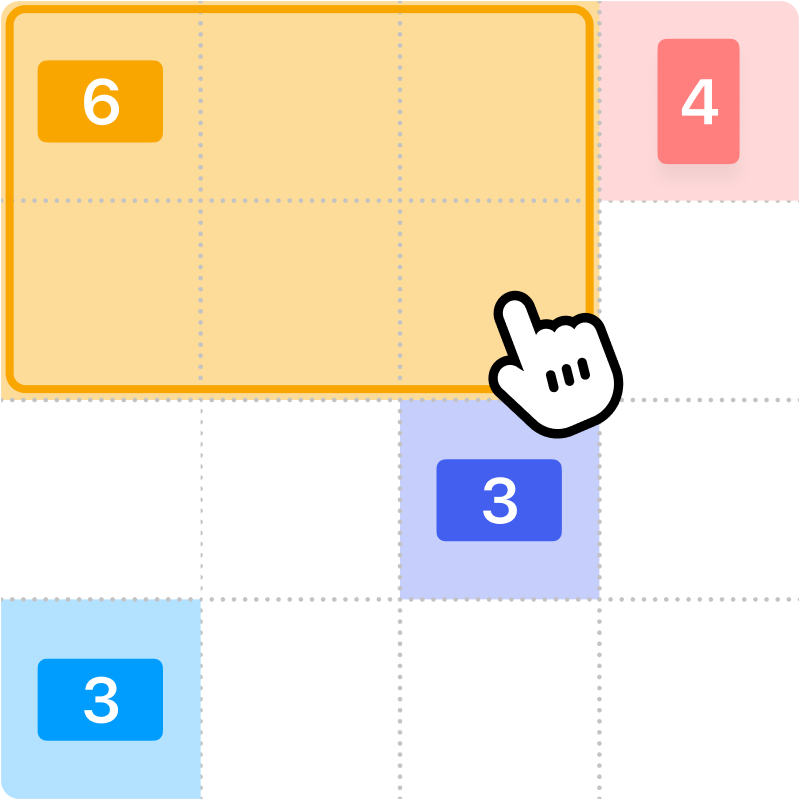
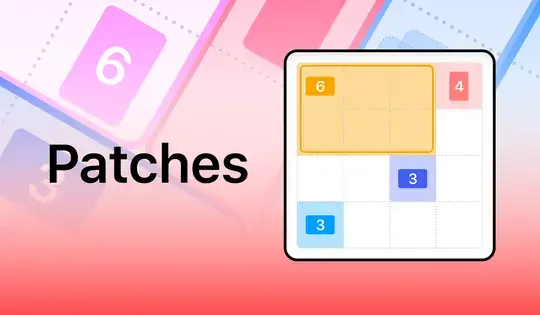
Fill up the grid with colorful shapes that won't overlap! Cells with a number on them show how many cells need to be that color. To start making your shapes, click on a numbered cell and drag your mouse to create the shape. You'll see which shape you need to make based on the icon in the numbered cell. Shapes are either squares, tall rectangles, or wide rectangles. There is also one special shape that can be a tall rectangle, wide rectangle, or square!
Once you've created the shape, release the mouse button. If the shape you made was incorrect, click on it to remove it from the grid. You can also click the Undo button to undo your last move. If you get stuck, click the Hint button to see where to draw your shape.
Try to finish the game as fast as possible, and come back each day for a new puzzle!
グリッドを、重ならないようにカラフルな図形で埋めましょう!数字が書かれたセルは、その色にする必要があるセルの数を示しています。図形を作成するには、数字の書かれたセルをクリックし、マウスをドラッグして図形を作成します。数字の書かれたセル内のアイコンに基づいて、作成する必要のある図形がわかります。図形は、正方形、縦長の長方形、横長の長方形のいずれかです。また、縦長の長方形、横長の長方形、または正方形になることができる特別な図形も1つあります。
図形を作成したら、マウスボタンを離してください。作成した図形が間違っていた場合は、クリックしてグリッドから削除してください。また、「元に戻す」ボタンをクリックすると、直前の操作を取り消すことができます。行き詰まった場合は、「ヒント」ボタンをクリックすると、図形を描画する場所が表示されます。
できるだけ早くゲームをクリアして、毎日新しいパズルに挑戦しよう!
Just a moment while your advertisement loads
広告
Just a moment while your advertisement loads
広告
Patches by LinkedIn
レビューしたゲーム内容Jonathan Keefer
指示
Fill up the grid with colorful shapes that won't overlap! Cells with a number on them show how many cells need to be that color. To start making your shapes, click on a numbered cell and drag your mouse to create the shape. You'll see which shape you need to make based on the icon in the numbered cell. Shapes are either squares, tall rectangles, or wide rectangles. There is also one special shape that can be a tall rectangle, wide rectangle, or square!
Once you've created the shape, release the mouse button. If the shape you made was incorrect, click on it to remove it from the grid. You can also click the Undo button to undo your last move. If you get stuck, click the Hint button to see where to draw your shape.
Try to finish the game as fast as possible, and come back each day for a new puzzle!
グリッドを、重ならないようにカラフルな図形で埋めましょう!数字が書かれたセルは、その色にする必要があるセルの数を示しています。図形を作成するには、数字の書かれたセルをクリックし、マウスをドラッグして図形を作成します。数字の書かれたセル内のアイコンに基づいて、作成する必要のある図形がわかります。図形は、正方形、縦長の長方形、横長の長方形のいずれかです。また、縦長の長方形、横長の長方形、または正方形になることができる特別な図形も1つあります。
図形を作成したら、マウスボタンを離してください。作成した図形が間違っていた場合は、クリックしてグリッドから削除してください。また、「元に戻す」ボタンをクリックすると、直前の操作を取り消すことができます。行き詰まった場合は、「ヒント」ボタンをクリックすると、図形を描画する場所が表示されます。
できるだけ早くゲームをクリアして、毎日新しいパズルに挑戦しよう!


