










Leaving the Nest
You'll Also Like














Instructions
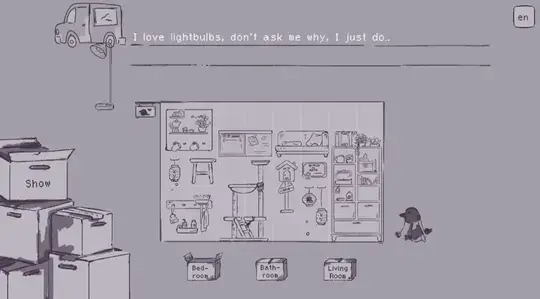
On your own in your new nest, there's nothing else to do but decorate it to your heart's content! Click to progress the dialogue and then you can start decorating!
You have three rooms to decorate: Bedroom, Bathroom, and Living Room. You can click on the boxes on the bottom of the screen to switch between rooms.
When you get your first piece of furniture on the left side of the screen, click it and drag it onto the grid. Once you've placed it, a new piece of furniture will appear! If you're not ready to place a piece of furniture in that room, put it on the right side of the screen to save it for later.
Each piece of furniture requires a certain number of spaces to be placed; so make sure you have enough room for all your cool stuff!
Once you finish decorating your rooms, click on the Done button and you'll get to see postcards of your decorated rooms!
On your own in your new nest, there's nothing else to do but decorate it to your heart's content! Click to progress the dialogue and then you can start decorating!
You have three rooms to decorate: Bedroom, Bathroom, and Living Room. You can click on the boxes on the bottom of the screen to switch between rooms.
When you get your first piece of furniture on the left side of the screen, click it and drag it onto the grid. Once you've placed it, a new piece of furniture will appear! If you're not ready to place a piece of furniture in that room, put it on the right side of the screen to save it for later.
Each piece of furniture requires a certain number of spaces to be placed; so make sure you have enough room for all your cool stuff!
Once you finish decorating your rooms, click on the Done button and you'll get to see postcards of your decorated rooms!
How to play Leaving the Nest on your phone
Did you know you can also play Leaving the Nest on your phone? It’s a great way to play without worrying about losing your save data.
For iOS devices, simply tap the "Share" icon  in Safari and select "Add to Home Screen". For Android devices, tap the “Menu” icon
  and select "Install App".
Game Progress


You'll Also Like
Instructions
On your own in your new nest, there's nothing else to do but decorate it to your heart's content! Click to progress the dialogue and then you can start decorating!
You have three rooms to decorate: Bedroom, Bathroom, and Living Room. You can click on the boxes on the bottom of the screen to switch between rooms.
When you get your first piece of furniture on the left side of the screen, click it and drag it onto the grid. Once you've placed it, a new piece of furniture will appear! If you're not ready to place a piece of furniture in that room, put it on the right side of the screen to save it for later.
Each piece of furniture requires a certain number of spaces to be placed; so make sure you have enough room for all your cool stuff!
Once you finish decorating your rooms, click on the Done button and you'll get to see postcards of your decorated rooms!
How to play Leaving the Nest on your phone
To play Leaving the Nest easily any time, you can add it directly to your phone as an app. It’s a great way to play without worrying about losing your game save data.
For iOS devices, simply tap the "Share" icon in Safari and select "Add to Home Screen". For Android devices, tap the “Menu” icon and select "Install App".

Votes