












Tune it Up!
You'll Also Like








Instructions
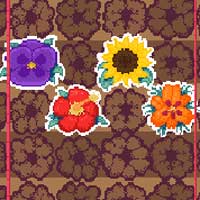
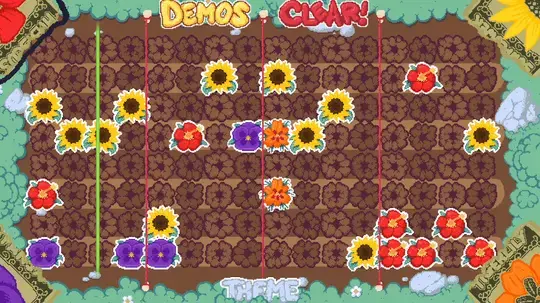
Drag a note from any of the four corners to place it. Each corner has a different image, which plays a different tone in your song. You can double tap on one of the corners to select that instrument. Then tap directly on the board to place a note. Tap any note to remove it.
To hear different styles of music, tap on the Theme button to switch between garden, space, and tea party!
While you make music, strange objects will float into the space. Tap on those to speed up or slow down the tempo or start a mini-game.
If you're looking for some inspiration, tap on the Demos button to hear a premade tune.
Click and drag a note from any of the four corners to place it. Each corner has a different image, which plays a different tone in your song. You can double click on one of the corners to select that instrument. Then click directly on the board to place a note. Right click any note to remove it.
To hear different styles of music, click on the Theme button to switch between garden, space, and tea party!
While you make music, strange objects will float into the space. Click on those to speed up or slow down the tempo or start a mini-game.
If you're looking for some inspiration, click on the Demos button to hear a premade tune.
How to play Tune it Up! on your phone
Did you know you can also play Tune it Up! on your phone? It’s a great way to play without worrying about losing your save data.
For iOS devices, simply tap the "Share" icon  in Safari and select "Add to Home Screen". For Android devices, tap the “Menu” icon
  and select "Install App".
Game Progress


You'll Also Like
Instructions
Drag a note from any of the four corners to place it. Each corner has a different image, which plays a different tone in your song. You can double tap on one of the corners to select that instrument. Then tap directly on the board to place a note. Tap any note to remove it.
To hear different styles of music, tap on the Theme button to switch between garden, space, and tea party!
While you make music, strange objects will float into the space. Tap on those to speed up or slow down the tempo or start a mini-game.
If you're looking for some inspiration, tap on the Demos button to hear a premade tune.
How to play Tune it Up! on your phone
To play Tune it Up! easily any time, you can add it directly to your phone as an app. It’s a great way to play without worrying about losing your game save data.
For iOS devices, simply tap the "Share" icon in Safari and select "Add to Home Screen". For Android devices, tap the “Menu” icon and select "Install App".

Votes