





Siamo spiacenti... questo gioco non è riproducibile nel tuo browser.

Questo gioco Flash non è attualmente riproducibile nel tuo browser, ma stiamo lavorando a una soluzione! Torna regolarmente per vedere se è pronto per giocare.
La maggior parte dei browser non supporta più Flash. I giochi interessati sono indicati da


Ziel
Contenuti del gioco recensiti daAntonia Gates
Istruzioni
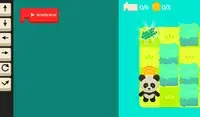
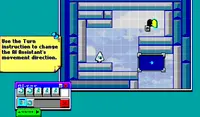
Program your way to the goal! Your player will not move until you give your commands. On the right side of the screen is the command prompt, where you will see the different commands available. These commands will determine how the player moves.
Click on a command to add it to the prompt. If you select a command that makes the player move, a slider will appear next to it. Move the slider to the number of times you want the player to move in that direction. Once you've finished, click the Play Level button to make your player move. Try to plan out each level so you can collect all three stars!
The position of each command is important! The first command you select will run first, then the second one will run, and so on. If you want to move a command, press the arrow next to that command to move it up or down. To remove a command, press the X button next to that command. If you don't see the arrows or X button, use the scrollbar on the bottom to see them.
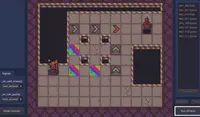
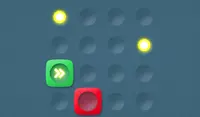
In some levels, there are obstacles to avoid. Avoid red spikes and be careful of red blocks; these blocks will move their position after every movement you make. If you get hit, you'll need to start over!
Programma il tuo percorso verso l'obiettivo! Il tuo giocatore non si muoverà finché non gli darai i tuoi comandi. Sul lato destro dello schermo c'è il prompt dei comandi, dove vedrai i diversi comandi disponibili. Questi comandi determineranno il modo in cui il giocatore si muoverà.
Fai clic su un comando per aggiungerlo al prompt. Se selezioni un comando che fa muovere il giocatore, accanto ad esso apparirà un cursore. Sposta il cursore sul numero di volte in cui desideri che il giocatore si muova in quella direzione. Una volta terminato, fai clic sul pulsante Gioca Livello per far muovere il giocatore. Cerca di pianificare ogni livello in modo da poter raccogliere tutte e tre le stelle!
La posizione di ogni comando è importante! Il primo comando selezionato verrà eseguito per primo, poi verrà eseguito il secondo e così via. Per spostare un comando, premi la freccia accanto a quel comando per spostarlo verso l'alto o verso il basso. Per rimuovere un comando, premi il pulsante X accanto a quel comando. Se non vedi le frecce o il pulsante X, usa la barra di scorrimento in basso per visualizzarli.
In alcuni livelli, ci sono ostacoli da evitare. Evita le punte rosse e fai attenzione ai blocchi rossi; questi blocchi cambieranno posizione dopo ogni tuo movimento. Se vieni colpito, dovrai ricominciare da capo!
Just a moment while your advertisement loads
Annuncio
Just a moment while your advertisement loads
Annuncio
Ziel
Contenuti del gioco recensiti daAntonia Gates
Istruzioni
Program your way to the goal! Your player will not move until you give your commands. On the right side of the screen is the command prompt, where you will see the different commands available. These commands will determine how the player moves.
Click on a command to add it to the prompt. If you select a command that makes the player move, a slider will appear next to it. Move the slider to the number of times you want the player to move in that direction. Once you've finished, click the Play Level button to make your player move. Try to plan out each level so you can collect all three stars!
The position of each command is important! The first command you select will run first, then the second one will run, and so on. If you want to move a command, press the arrow next to that command to move it up or down. To remove a command, press the X button next to that command. If you don't see the arrows or X button, use the scrollbar on the bottom to see them.
In some levels, there are obstacles to avoid. Avoid red spikes and be careful of red blocks; these blocks will move their position after every movement you make. If you get hit, you'll need to start over!
Programma il tuo percorso verso l'obiettivo! Il tuo giocatore non si muoverà finché non gli darai i tuoi comandi. Sul lato destro dello schermo c'è il prompt dei comandi, dove vedrai i diversi comandi disponibili. Questi comandi determineranno il modo in cui il giocatore si muoverà.
Fai clic su un comando per aggiungerlo al prompt. Se selezioni un comando che fa muovere il giocatore, accanto ad esso apparirà un cursore. Sposta il cursore sul numero di volte in cui desideri che il giocatore si muova in quella direzione. Una volta terminato, fai clic sul pulsante Gioca Livello per far muovere il giocatore. Cerca di pianificare ogni livello in modo da poter raccogliere tutte e tre le stelle!
La posizione di ogni comando è importante! Il primo comando selezionato verrà eseguito per primo, poi verrà eseguito il secondo e così via. Per spostare un comando, premi la freccia accanto a quel comando per spostarlo verso l'alto o verso il basso. Per rimuovere un comando, premi il pulsante X accanto a quel comando. Se non vedi le frecce o il pulsante X, usa la barra di scorrimento in basso per visualizzarli.
In alcuni livelli, ci sono ostacoli da evitare. Evita le punte rosse e fai attenzione ai blocchi rossi; questi blocchi cambieranno posizione dopo ogni tuo movimento. Se vieni colpito, dovrai ricominciare da capo!


