





Entschuldigung ... Dieses Spiel ist in Ihrem Browser nicht spielbar.

Dieses Flash -Spiel ist derzeit in Ihrem Browser derzeit nicht spielbar, aber wir arbeiten an einem Fix! Kommen Sie regelmäßig zurück, um zu sehen, ob es bereit ist zu spielen.
Die meisten Browser unterstützen Flash nicht mehr. Betroffene Spiele werden durch angegeben


Spielinhalt überprüft vonAntonia Gates
Erfahren Sie mehr über unsere Richtlinien zur Spielbewertung
Anweisungen
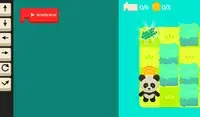
Program your way to the goal! Your player will not move until you give your commands. On the right side of the screen is the command prompt, where you will see the different commands available. These commands will determine how the player moves.
Click on a command to add it to the prompt. If you select a command that makes the player move, a slider will appear next to it. Move the slider to the number of times you want the player to move in that direction. Once you've finished, click the Play Level button to make your player move. Try to plan out each level so you can collect all three stars!
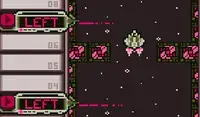
The position of each command is important! The first command you select will run first, then the second one will run, and so on. If you want to move a command, press the arrow next to that command to move it up or down. To remove a command, press the X button next to that command. If you don't see the arrows or X button, use the scrollbar on the bottom to see them.
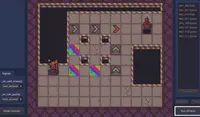
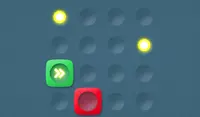
In some levels, there are obstacles to avoid. Avoid red spikes and be careful of red blocks; these blocks will move their position after every movement you make. If you get hit, you'll need to start over!
Programmiere deinen Weg zum Ziel! Dein Spieler bewegt sich erst, wenn du Befehle gibst. Rechts auf dem Bildschirm befindet sich die Befehlszeile, in der du die verschiedenen verfügbaren Befehle siehst. Diese Befehle bestimmen die Bewegung des Spielers.
Klicke auf einen Befehl, um ihn der Eingabeaufforderung hinzuzufügen. Wenn du einen Befehl auswählst, der den Spieler bewegt, erscheint daneben ein Schieberegler. Bewege den Regler, um die gewünschte Anzahl an Bewegungen in die entsprechende Richtung festzulegen. Klicke anschließend auf „Level starten“, um die Bewegung zu starten. Plane jedes Level so, dass du alle drei Sterne sammeln kannst!
Die Position jedes Befehls ist wichtig! Der erste ausgewählte Befehl wird zuerst ausgeführt, dann der zweite usw. Um einen Befehl zu verschieben, drücken Sie den Pfeil daneben. Zum Entfernen eines Befehls drücken Sie das X daneben. Falls die Pfeile oder das X nicht angezeigt werden, verwenden Sie die Bildlaufleiste unten.
In manchen Levels gilt es, Hindernissen auszuweichen. Weiche den roten Stacheln aus und sei vorsichtig mit den roten Blöcken; diese Blöcke verändern ihre Position nach jeder deiner Bewegungen. Wenn du getroffen wirst, musst du von vorne beginnen!
Nur einen Moment, während Ihre Anzeige geladen wird
Werbung
Nur einen Moment, während Ihre Anzeige geladen wird
Werbung
Ziel
Spielinhalt überprüft vonAntonia Gates
Erfahren Sie mehr über unsere Richtlinien zur Spielbewertung
Anweisungen
Program your way to the goal! Your player will not move until you give your commands. On the right side of the screen is the command prompt, where you will see the different commands available. These commands will determine how the player moves.
Click on a command to add it to the prompt. If you select a command that makes the player move, a slider will appear next to it. Move the slider to the number of times you want the player to move in that direction. Once you've finished, click the Play Level button to make your player move. Try to plan out each level so you can collect all three stars!
The position of each command is important! The first command you select will run first, then the second one will run, and so on. If you want to move a command, press the arrow next to that command to move it up or down. To remove a command, press the X button next to that command. If you don't see the arrows or X button, use the scrollbar on the bottom to see them.
In some levels, there are obstacles to avoid. Avoid red spikes and be careful of red blocks; these blocks will move their position after every movement you make. If you get hit, you'll need to start over!
Programmiere deinen Weg zum Ziel! Dein Spieler bewegt sich erst, wenn du Befehle gibst. Rechts auf dem Bildschirm befindet sich die Befehlszeile, in der du die verschiedenen verfügbaren Befehle siehst. Diese Befehle bestimmen die Bewegung des Spielers.
Klicke auf einen Befehl, um ihn der Eingabeaufforderung hinzuzufügen. Wenn du einen Befehl auswählst, der den Spieler bewegt, erscheint daneben ein Schieberegler. Bewege den Regler, um die gewünschte Anzahl an Bewegungen in die entsprechende Richtung festzulegen. Klicke anschließend auf „Level starten“, um die Bewegung zu starten. Plane jedes Level so, dass du alle drei Sterne sammeln kannst!
Die Position jedes Befehls ist wichtig! Der erste ausgewählte Befehl wird zuerst ausgeführt, dann der zweite usw. Um einen Befehl zu verschieben, drücken Sie den Pfeil daneben. Zum Entfernen eines Befehls drücken Sie das X daneben. Falls die Pfeile oder das X nicht angezeigt werden, verwenden Sie die Bildlaufleiste unten.
In manchen Levels gilt es, Hindernissen auszuweichen. Weiche den roten Stacheln aus und sei vorsichtig mit den roten Blöcken; diese Blöcke verändern ihre Position nach jeder deiner Bewegungen. Wenn du getroffen wirst, musst du von vorne beginnen!


