








Rullo




 3.7 / 5(1,591 Votes)
Instructions
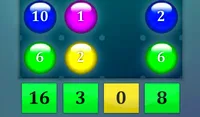
Remove numbers from the grid so that the remaining numbers in each row or column add up to the numbers next to that row or column. Tap a number to remove it or add it back. You can also tap and hold a number to "lock" it on. If you know that a particular number needs to be used, you can lock it on to make solving the rest of the puzzle easier.
Your goal is to remove numbers from the grid so that the remaining numbers in each row or column add up to the numbers next to that row or column. Click to remove or turn off a number, or click a removed number to add it back in. You can also click and hold a number to "lock" it on. If you know that a particular number needs to be used, you can lock it on to make solving the rest of the puzzle easier.
How to play Rullo on your phone
Did you know you can also play Rullo on your phone? It’s a great way to play without worrying about losing your save data.
For iOS devices, simply tap the "Share" icon  in Safari and select "Add to Home Screen". For Android devices, tap the “Menu” icon
 and select "Install App".

Game Progress

 3.7 / 5(1,591 Votes)
Instructions
Remove numbers from the grid so that the remaining numbers in each row or column add up to the numbers next to that row or column. Tap a number to remove it or add it back. You can also tap and hold a number to "lock" it on. If you know that a particular number needs to be used, you can lock it on to make solving the rest of the puzzle easier.
How to play Rullo on your phone
To play Rullo easily any time, you can add it directly to your phone as an app. It’s a great way to play without worrying about losing your game save data.
For iOS devices, simply tap the "Share" icon in Safari and select "Add to Home Screen". For Android devices, tap the “Menu” icon and select "Install App".
Votes